
Introduction
When you start deploying applications on AWS, one of the first steps is to design a network architecture that separates public and private resources.
A good design provides security, scalability, and controlled Internet access for your workloads.
In this article, we’ll build a basic AWS cloud architecture using Terraform, including:
- A VPC divided into public and private zones
- An Internet Gateway (IGW) and a NAT Gateway (NATGW)
- An Application Load Balancer (ALB)
- An EC2 instance in a private subnet
All infrastructure is created automatically using Terraform.
Architecture Overview
The diagram below illustrates the design:
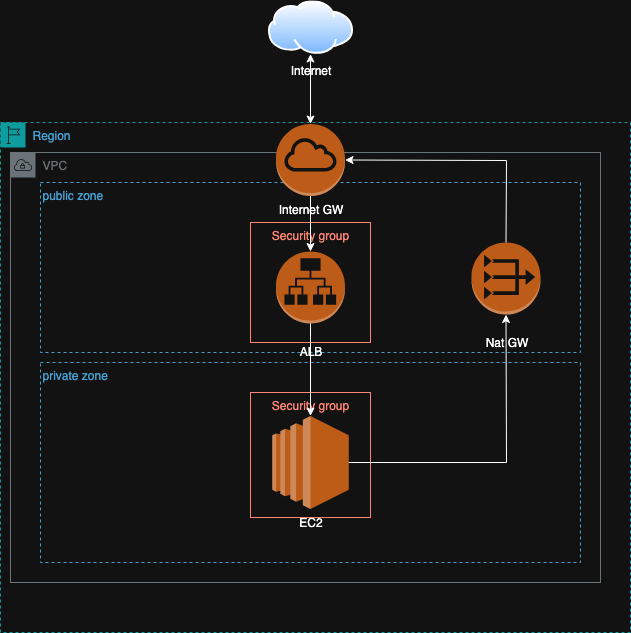
This architecture consists of
- 1 AWS Region — all resources are deployed inside a single region (e.g.,
ap-northeast-1in Tokyo). - 1 VPC — the isolated virtual network hosting all components.
- 2 subnet groups:
- Public zone — for Internet-facing components like ALB and NAT Gateway.
- Private zone — for internal components like EC2 or databases.
- 1 Internet Gateway (IGW) — enables Internet connectivity for public subnets.
- 1 NAT Gateway (NATGW) — allows outbound Internet access from private subnets.
- 1 Application Load Balancer (ALB) — routes inbound HTTP/HTTPS traffic to private EC2 instances.
- 1 EC2 instance — runs the backend application in the private subnet.
- 2 Security Groups —
- One for ALB (allowing HTTP/HTTPS from the Internet).
- One for EC2 (allowing inbound only from the ALB SG).
Region
An AWS Region is a geographical area (like ap-northeast-1 in Tokyo) containing multiple Availability Zones (AZs). Each subnet you create is placed in a specific AZ. Spreading subnets across AZs increases availability.
VPC (Virtual Private Cloud)
A VPC is your isolated network on AWS — like a virtual data center.
All subnets, gateways, and EC2 instances are created inside this VPC.
Public vs Private Zone
| Zone | Description | Typical Resources |
|---|---|---|
| Public Zone | Subnets that can communicate directly with the Internet via IGW. | ALB, NAT Gateway, Bastion host |
| Private Zone | Subnets without direct Internet access — traffic goes through NAT Gateway. | Application servers, databases |
Why this separation?
- Increases security by limiting what is publicly reachable.
- Prevents backend servers from being exposed directly to the Internet.
Internet Gateway (IGW)
The IGW is the main entry and exit point for the VPC to the Internet.
It enables public resources like ALB or NATGW to receive or send Internet traffic.
- Inbound traffic: Internet → IGW → ALB → Private EC2
- Outbound traffic (public resources): ALB / NATGW → IGW → Internet
Without an IGW, nothing in your VPC can reach the Internet.
NAT Gateway (NATGW)
A NAT Gateway allows instances in private subnets to access the Internet (for example, downloading updates or connecting to external APIs), while still keeping them unreachable from the outside.
- It sits inside a public subnet.
- It uses an Elastic IP (EIP) to go out through the IGW.
- Private subnets route outbound traffic to this NAT Gateway.
Why NATGW must be in a public subnet?
Because the NATGW itself needs Internet connectivity via IGW to function. It acts as a “translator” between private instances and the public Internet.
Application Load Balancer (ALB)
The ALB distributes inbound traffic (HTTP/HTTPS) to backend servers (EC2 instances) located in private subnets.
Why ALB in public zone?
- ALB must be reachable from the Internet to accept requests.
- But it forwards those requests internally to EC2 in private subnets — keeping servers protected.
EC2 Instance (Private Zone)
The EC2 instance is deployed in a private subnet.
It doesn’t have a public IP, and all its Internet access goes through the NAT Gateway.
Why private?
- Prevents direct SSH or HTTP access from the Internet.
- All inbound requests must pass through the ALB.
- Outbound traffic (e.g.
apt-get update) passes through NATGW.
Security Groups
Security Groups act as virtual firewalls for resources.
| Component | Inbound Rules | Outbound Rules |
|---|---|---|
| ALB SG | Allow HTTP/HTTPS (80/443) from 0.0.0.0/0 | Allow all |
| EC2 SG | Allow HTTP from ALB SG | Allow all |
This ensures only the ALB can talk to EC2, while blocking external access.
Terraform Implementation
https://github.com/luke-nguyen/phecloud/blob/main/01/README.md
Deployment Result
For detailed setup and execution steps, please refer to the README.md file included in the project repository.
After running:
terraform init
terraform apply
You should see Terraform create:
- 1 VPC
- 2 public and 2 private subnets
- 1 Internet Gateway
- 1 NAT Gateway
- 1 ALB
- 1 EC2 instance
Output example:
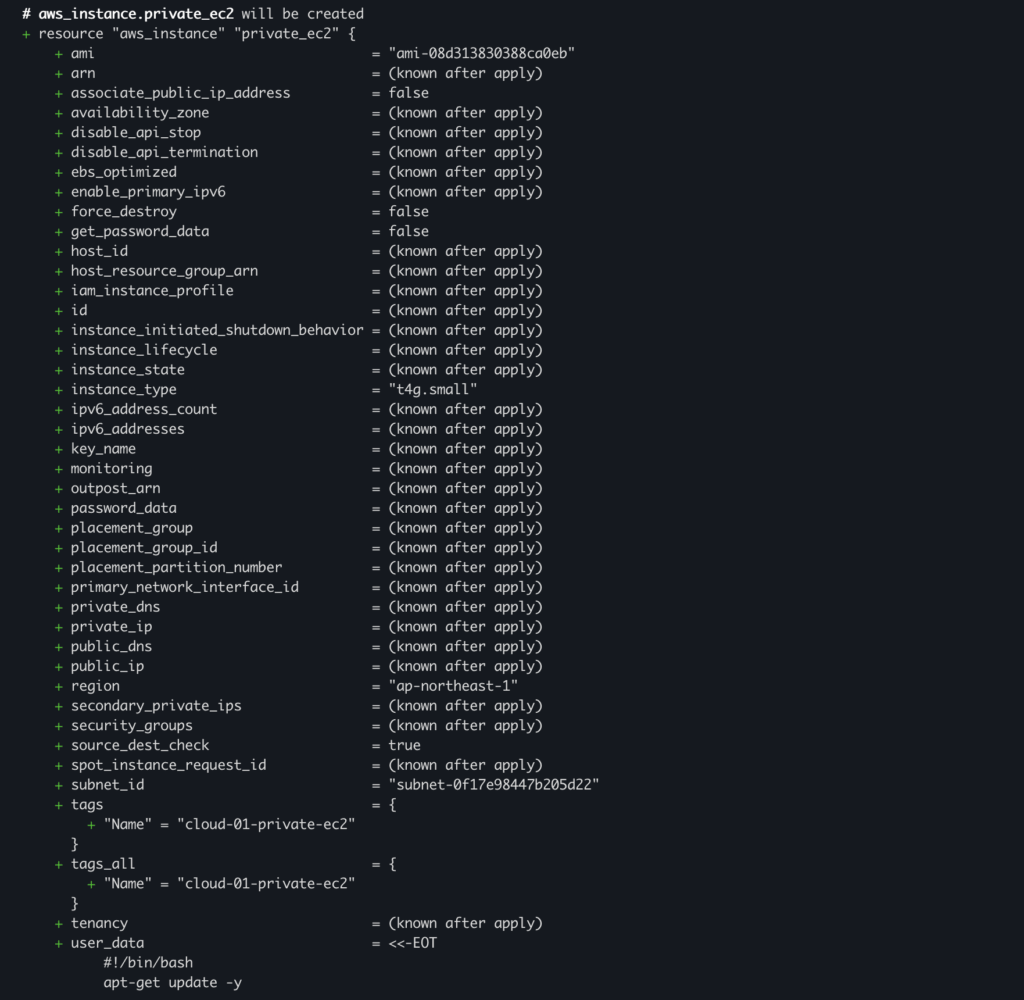
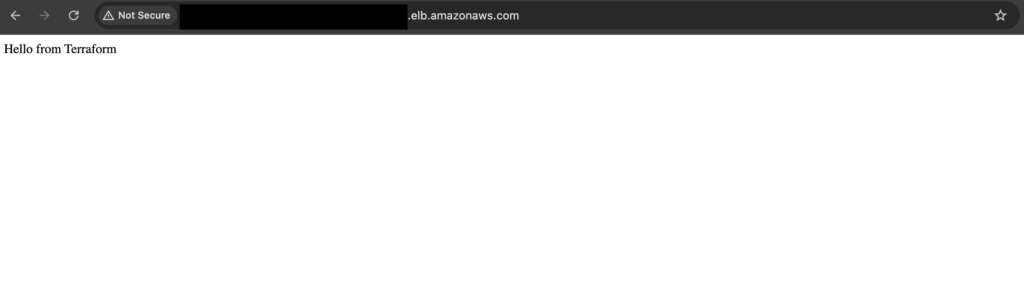
Access the ALB DNS name in your browser — you should see your web page served by the EC2 instance in the private subnet.
Conclusion
With just a few Terraform files, we’ve built a secure, well-structured AWS network:
- Public zone handles inbound/outbound Internet traffic.
- Private zone isolates internal workloads.
- ALB routes traffic intelligently, and NATGW allows safe outbound access.
This setup forms the foundation for any modern cloud architecture — from small web apps to enterprise-grade systems. You can easily extend it with Auto Scaling, RDS databases, or ECS clusters later.